


Audit, then optimize
We audit your Google Business Profile and fix what’s missing or weak: categories, services, description and attributes. Then we keep it optimized.
Google Business Profile management is the monthly work of keeping your Google listing complete and active: the right categories and services, fresh posts, photos and videos, a review request after every job with replies to new reviews, and reports that show where you rank on Google Maps. We do all of it for home service contractors, every month.
Rated 4.9 on Google 336 reviewsThis is the work, item by item.
We audit your Google Business Profile and fix what’s missing or weak: categories, services, description and attributes. Then we keep it optimized.
We publish posts, offers, updates, photos and videos on your profile on an ongoing schedule. Every update goes out on all 6: your Google Business Profile, Facebook, Instagram, TikTok, YouTube and LinkedIn. The content includes edited videos with voiceover and captions.
We start with a review campaign to your past customers. Then every completed job triggers a text and an email asking for a Google review, with a direct link. We reply to your new Google reviews.
Our local visibility program increases real engagement with your listing, working to get it showing up higher.
We work to get you showing up in AI search results, and we track how you show up in ChatGPT, Google AI Mode, Gemini, Claude, Grok and Perplexity.
A Day 1 snapshot of where you rank on Google Maps, a progress report every two weeks and a monthly ranking heatmap.
Want the review side in more depth? Read review management for contractors or how to get more Google reviews. For the posting side, see social media management for contractors.
Google publishes the basics: “Local results are mainly based on relevance, distance, and popularity.” The same page has sections headed Relevance, Distance and Prominence, summarized below. Google also says: “There’s no way to request or pay for a better local ranking on Google.” Our work is on the parts of your profile Google points to: complete business info, reviews and replies, and photos and videos.
| Google’s heading | What Google says | What we do |
|---|---|---|
| Relevance | How well your Business Profile matches what someone is searching for. Google says complete and detailed business info helps it match you to relevant searches. | Your categories, services, description and attributes, audited and then kept optimized. |
| Distance | How far your business is from the customer who is searching. | Your monthly report includes a ranking heatmap. |
| Prominence | How well-known your business is. Google says this is also based on info like how many websites link to your business and how many reviews you have, and that more reviews and positive ratings can help your local ranking. | A review request after every completed job, and replies to your new reviews. |
Source: Google Business Profile Help, Tips to improve your local ranking on Google.
Your past customers get the kickoff review campaign.
We never need your website login or your Google password. Your Google Business Profile, your reviews and everything posted to it stay yours.
| Approach | What it costs you | What it looks like |
|---|---|---|
| Do nothing | Jobs lost on Google | Your Google profile stays the way it was the day it was set up, not optimized to show up. Nobody asks for the review, so it never gets written. |
| Do it yourself | Your time | You create the content, write the captions and post on every social account, ask every customer for a review, reply to every one and track your rankings. On top of running jobs. |
| A typical agency | Thousands per month | Most agencies sell you a contract and go quiet. |
| Omnipresent Marketing | Free for 10 days | We manage your Google presence every month. Automated review requests after every job. Fresh posts, photos and videos. Content shared across Google + social. Progress report every 2 weeks. No long-term contract. |
These come from Google’s own guidelines and policies, linked below.
Sources: Google Business Profile Help, Guidelines for representing your business on Google and Manage your service areas; Google Maps Help, Fake and misleading content and behavior.
We work with home service contractors: plumbing, HVAC, electrical, roofing, remodeling, landscaping and more. The system is the same for every trade. The way it runs changes for yours.

Channel Islands Pressure Washing went from 0% to 94% top 3 coverage in 7 days.
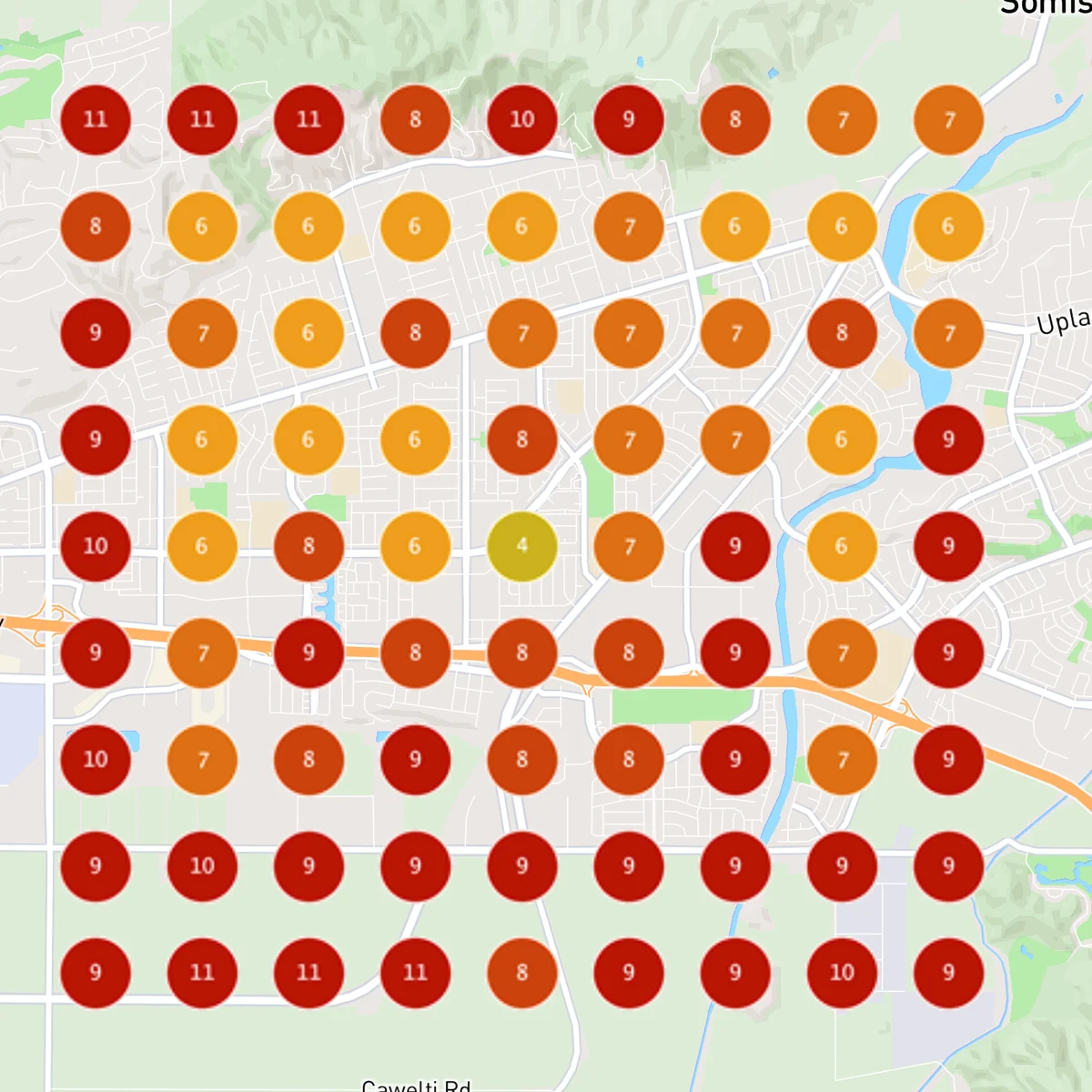
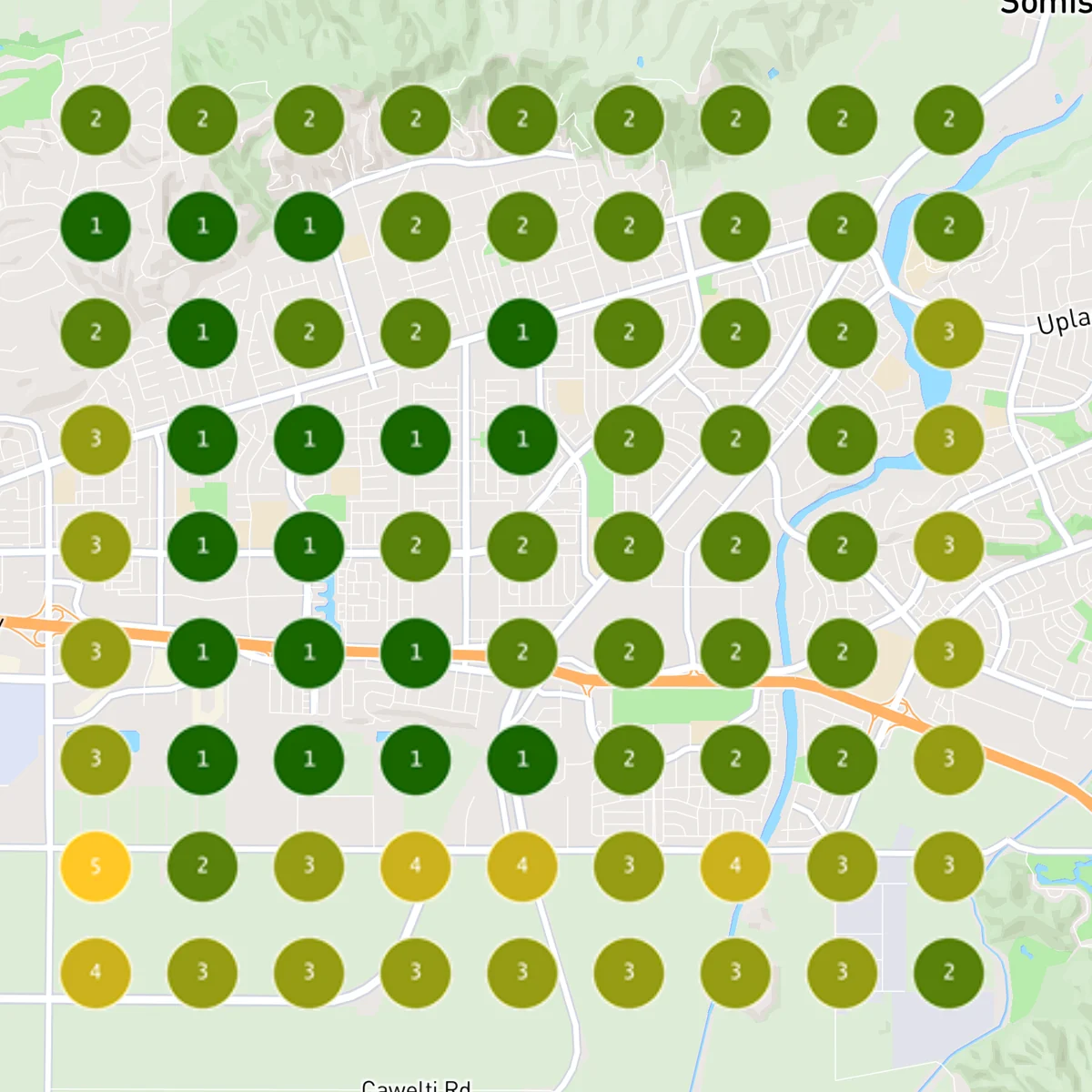
Each map is a 9 by 9 grid of Google Maps ranking pins. These are one business’s dated scans, not a promised position. Omnipresent Marketing is rated 4.9 on Google from 336 Google reviews.
We are a San Diego marketing agency. Every account is built and run from San Diego. We serve contractors and home services in San Diego and across the United States. Local to San Diego? See Google Business Profile management in San Diego.
It is the work of keeping your Google listing complete and active: the right categories and services, posts, photos and videos, a review request after every job with replies to new reviews, and reporting on where you show up on Google Maps.
We audit and optimize your Google Business Profile (categories, services, description and attributes), then keep it active with posts, offers, updates, photos and videos. We run a review campaign to your past customers, then a text and an email asking for a Google review after every completed job, and we reply to your new Google reviews. We post to your Google Business Profile, Facebook, Instagram, TikTok, YouTube and LinkedIn. We work to get you showing up in AI search results, and we track how you show up.
No. We guarantee more Google reviews and a higher Google ranking, or your money back.
You can see results in as little as 10 days.
We never need your website login or your Google password. Your Google Business Profile, your reviews and everything posted to it stay yours.
About 5 to 10 minutes to set up. After that, drag your job photos and videos into a link we send you.
Your price depends on your business and market, and we set it together on a quick call.
No, your plan is month-to-month. Cancel any time by emailing support@omnipresent.app or calling (619) 975-1535.
Omnipresent is built for contractors and home services: plumbing, HVAC, electrical, roofing, remodeling, landscaping, and more. Not sure yours fits? Ask on the call.
No. Every account is built and run from San Diego. We serve contractors and home services in San Diego and across the United States.
We run your reviews, Google profile and AI search every month so those calls keep coming. Try it free for 10 days. We guarantee more Google reviews and a higher Google ranking, or your money back.