Google Business Profile for contractors: how to rank on Google Maps

Google says local results are mainly based on relevance, distance, and popularity. Our read: for a contractor, the part you control comes down to the right primary category, every service you really offer, accurate details, an active profile, a steady flow of honest reviews, and a website that backs up your profile.

By Blake Ernst, founder of Omnipresent Marketing Updated

  • HVAC
  • Plumbing
  • Roofing
  • Electrical
  • Construction
  • Landscaping
  • Painting
  • Concrete
  • Pest Control
  • Garage Doors
  • Solar
  • Tree Service
  • Fencing
  • Flooring
  • Cleaning
  • Pool Service

The short answer

  • Get the primary category right. The most specific category that represents your main business, checked against who already ranks for your main service.
  • Add every predefined service you offer. Pick from Google’s own list first, then add custom services.
  • Keep your details exact. Your real-world name, a phone and website that go straight to your business, and real hours.
  • Keep it active. Fresh photos, videos and updates. Google lists adding photos and videos and keeping your info up to date among its tips to improve your local ranking.
  • Earn reviews from every job. Google says more reviews and positive ratings can help your local ranking.
  • Back it up on your website. A clear page for each main service, with the same name and phone as your profile.
  • Skip the shortcuts. Sterling Sky found extra service-area cities do not currently move rankings, Google does not permit extra words in your business name, and Google says you cannot pay for a better local ranking.

How Google ranks your profile

Google is direct about it: “Local results are mainly based on relevance, distance, and popularity.” Its help page then explains three factors: relevance, distance and prominence.

Relevance is “how well a Business Profile matches what someone is searching for.” Distance is “how far each business is from the customer who’s searching.” Prominence means “how well-known a business is,” and Google says it is also based on info like “how many websites link to your business and how many reviews you have.”

Our read for contractors: you cannot move your shop closer to every customer, so the work goes into relevance and prominence. That is what the rest of this guide covers. And there is no shortcut: “There’s no way to request or pay for a better local ranking on Google.”

Source: Google Business Profile Help, “Tips to improve your local ranking on Google”, read October 2026.

Choose your primary category

Your primary category tells Google what kind of business you are. Google’s guidelines: “Choose categories that are as specific as possible, but representative of your main business,” and “Use as few categories as possible to describe your overall core business from the provided list.” Google also says: “Do not use categories solely as keywords or to describe attributes of your business.”

If more than one category could describe your business, here is the method we use to pick.

  1. Search your main service and city

    On Google Maps, search what your best customers search, for example your trade plus your city.

  2. Note the category of the top results

    Write down the category each of the top three businesses lists.

  3. Pick the one that truly describes you

    If the top results agree and that category describes your main business, make it your primary. Add secondary categories only for other core parts of your business.

Quotes from Google Business Profile Help, “Guidelines for representing your business on Google”, read October 2026. The three-step method is ours.

Add your services, Google’s list first

In your profile’s services section, Google may offer predefined services for your category, and you may be able to add custom ones. If your category has a predefined list, start there and select every service you really offer.

Sterling Sky, a local search agency that publishes its tests, reports that “Services impact ranking,” and adds that “The ranking impact seems to vary based on the industry and market.” Their test covered predefined services. Then add custom services for anything you do that the list misses, each with a short, plain description.

One more reason to keep the list complete. When a customer reviews a service business, Google may ask them which job you did, and those job types come from your service list, your website (if available), or a standard list of tasks based on your business type or other authoritative sources. If a job you do is missing, add it to your service list so customers can pick it.


Sources: Sterling Sky, “GBP Services”; Google Business Profile Help, “About reviews for service businesses”. Read October 2026.

Your address, your service area and distance

Extra cities do not currently widen where you rank. Sterling Sky’s finding: “The service area does not currently impact the ranking for SAB’s” (service-area businesses). Set your service area so customers know where you work. Google allows up to 20 service areas, and says your overall area shouldn’t extend farther than about 2 hours of driving time from where your business is based.

Follow Google’s address rules. Google says: “If you’re a service-area business, you should hide your business address from customers,” and gives the example of a plumber who runs the business from a home address. Google also says service-area businesses can’t list a “virtual” office unless that office is staffed during business hours. If you serve customers at your address and want to set a service area, Google says that location should be staffed by your team and able to receive customers during its stated hours.

Our read: you will tend to show up strongest close to where your business is based. Plan your ranking goals around that, and let your website and reviews carry you farther.

Sources: Sterling Sky, “Does the Service Area in Your Google Business Profile Impact Ranking?”; Google Business Profile Help, “Manage your service area” and “Guidelines for representing your business on Google”. Read October 2026.

Name, phone, website and hours

Google: “Businesses with complete and accurate info are more likely to show up in local search results.” Google’s tips also list “Other details such as parking or Wi-Fi availability,” which are your attributes. Our recommendation: fill in every attribute that applies and a plain-words business description. Then check these four fields.

01

Your real-world name

Google says your name should reflect your business’s real-world name, and “Including unnecessary information in your business name isn’t permitted, and could result in the suspension of your Business Profile.” Google’s own example: “Midas Auto Service Experts” is not acceptable, “Midas” is.

02

A website that goes straight to your business

Google says: “Do not provide phone numbers or URLs that redirect or ‘refer’ users to landing pages or phone numbers other than those of the actual business.” Our recommendation: link the real page, and check that it loads without redirecting.

03

One phone number everywhere

Our recommendation: use the same number on your profile, your website and your directory listings. Keep call tracking numbers for paid ads.

04

Real hours

Google says to “Provide your regular customer-facing hours of operation,” and you can set special hours for holidays. Our recommendation: only list 24 hours if someone really answers.

Track what your profile sends you. Our recommendation: add a tracking tag to the website link on your profile, for example ?utm_source=google&utm_medium=organic&utm_campaign=gbp on the end of your homepage address. Our view: the tag only adds a label to the end of the same address, and your analytics can then show which visits came from your profile.

Sources: Google Business Profile Help, “Tips to improve your local ranking on Google” and “Guidelines for representing your business on Google”, read October 2026. Phone and tracking recommendations are ours.

Keep your profile active

Google publishes a page of tips to improve your local ranking. Alongside verifying your business, it tells you to keep your business information up to date, respond to reviews, and add photos and videos: “You can show customers what you offer and tell the story of your business with photos and videos.” On replies, Google says “Positive reviews and helpful replies can help your business stand out.”

Our view: a profile that keeps moving looks like a business that is open and busy. For a contractor, that means:

  • Real job photos and videos. Finished work, your crew and your trucks, added on a regular schedule.
  • Posts and offers. Recent jobs, seasonal services and current offers, so the profile never looks abandoned.
  • Up-to-date details. Hours, holiday hours, services and contact info that match what is true today.
  • Replies to every review. Short and personal, good and bad.

Quotes from Google Business Profile Help, “Tips to improve your local ranking on Google”, read October 2026. The list is ours.

Reviews: steady, honest, from every job

Our view: reviews are a prominence signal you can keep building, job after job. Google: “More reviews and positive ratings can help your business’s local ranking.” Our view: a steady flow from every completed job beats a burst followed by months of nothing.

Our recommendation: ask every customer the same way, with a direct link, and never offer a reward. If Google finds fake engagement, it may restrict your profile. Its examples: your profile “will not be able to receive new reviews or ratings for set period of time,” your existing reviews “will be unpublished for set period of time,” or your profile “will display a warning to let consumers know that fake reviews were removed.”

The full playbook, with templates, is in how to get more Google reviews as a contractor.

Sources: Google Business Profile Help, “Tips to improve your local ranking on Google” and “Business Profile restrictions for policy violations”, read October 2026.

Your website backs up your profile

Your profile says what you do. Your website is where you prove it. Our recommendation for contractors:

  • A page for each main service. If drain cleaning and water heaters are both on your profile, each gets its own page that explains the work and where you do it.
  • Titles that say what and where. Each page title names the service and your area in plain words.
  • The same name and phone as your profile. Matching details on every page.
  • Real proof. Your own job photos, your license number and the areas you actually work.
  • Links from real local sources. Google says prominence is also based on “how many websites link to your business.” Think suppliers, trade associations, your chamber of commerce and local sponsorships.

Quote from Google Business Profile Help, “Tips to improve your local ranking on Google”, read October 2026. The website recommendations are ours.

Shortcuts to skip

Here is what the sources say about some shortcuts you will hear.

Google Business Profile shortcuts and what the sources say
The shortcutWhat the source saysSource
Add more cities to your service area“The service area does not currently impact the ranking for SAB’s” (service-area businesses).Sterling Sky
Add service words to your business nameUnnecessary information is not permitted, and Google says it “could result in the suspension of your Business Profile.”Google guidelines
Pay Google for a better ranking“There’s no way to request or pay for a better local ranking on Google.”Google Business Profile Help

Sources: Sterling Sky, “Does the Service Area in Your Google Business Profile Impact Ranking?”; Google Business Profile Help, “Guidelines for representing your business on Google” and “Tips to improve your local ranking on Google”. Read October 2026.

The contractor Google Business Profile checklist

  • Verified profile, so Google knows you are authorized to represent the business.
  • Primary category checked against the top results for your main service and city.
  • Secondary categories only for other core parts of your business.
  • Every predefined service you really offer, then custom services with short descriptions.
  • Business name exactly as customers know it, with nothing added.
  • Address and service area set by Google’s rules for your business type.
  • Phone that reaches your business, the same one on your website and listings.
  • Website link that goes straight to your real page, with a tracking tag.
  • Description and attributes filled in, in plain words.
  • Hours that match when customers can reach you, plus holiday hours.
  • Review requests after every completed job, the same way for every customer, and a reply to every review.
  • Website pages for each main service, with matching name and phone.
  • Links from real local sources like suppliers, trade associations and your chamber of commerce.
  • An active profile: real job photos and videos, posts and offers on a regular schedule, and services and contact info kept current.

How we run it for contractors

For home service contractors, we run this profile work for you. Every account is built and run from San Diego.

  1. Set up in about 5 to 10 minutes

    Fill out a short intake form, connect your Google Business Profile once and share your customer list. We never need your website login or your Google password.

  2. Profile audit and fixes

    We audit your Google Business Profile, then optimize your categories, services, description and attributes.

  3. Reviews from every job

    A kickoff review campaign to your past customers, then a text and an email after every completed job, and replies to your new Google reviews.

  4. A profile that stays active

    Posts, offers, updates, photos and videos on an ongoing schedule, plus our local visibility program, which increases real engagement with your listing, working to get it showing up higher.

  5. AI search

    We work to get you showing up in AI search results, and we track how you show up.

  6. Reports on what changed

    A Day 1 snapshot, a progress report every two weeks and a monthly report with a ranking heatmap.

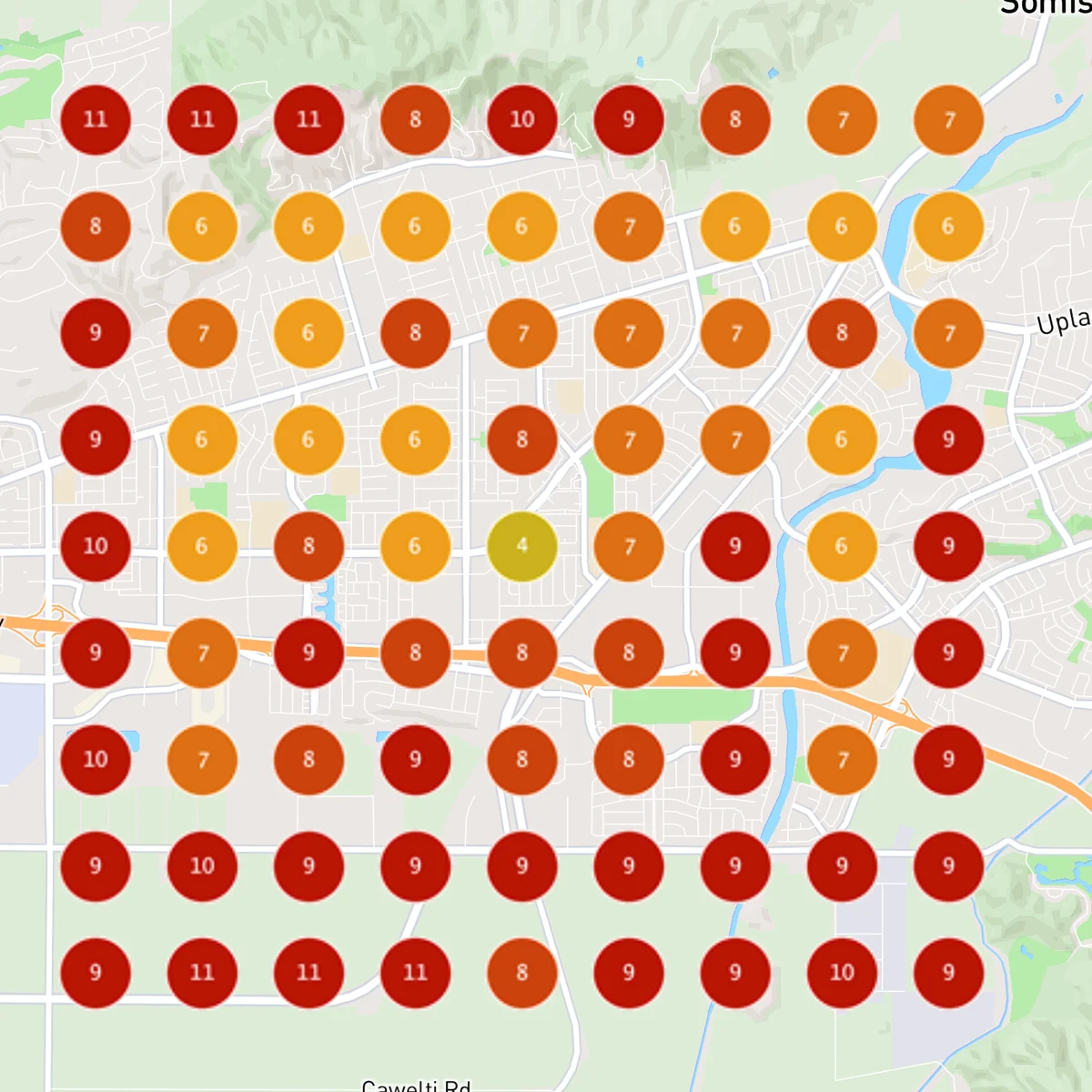
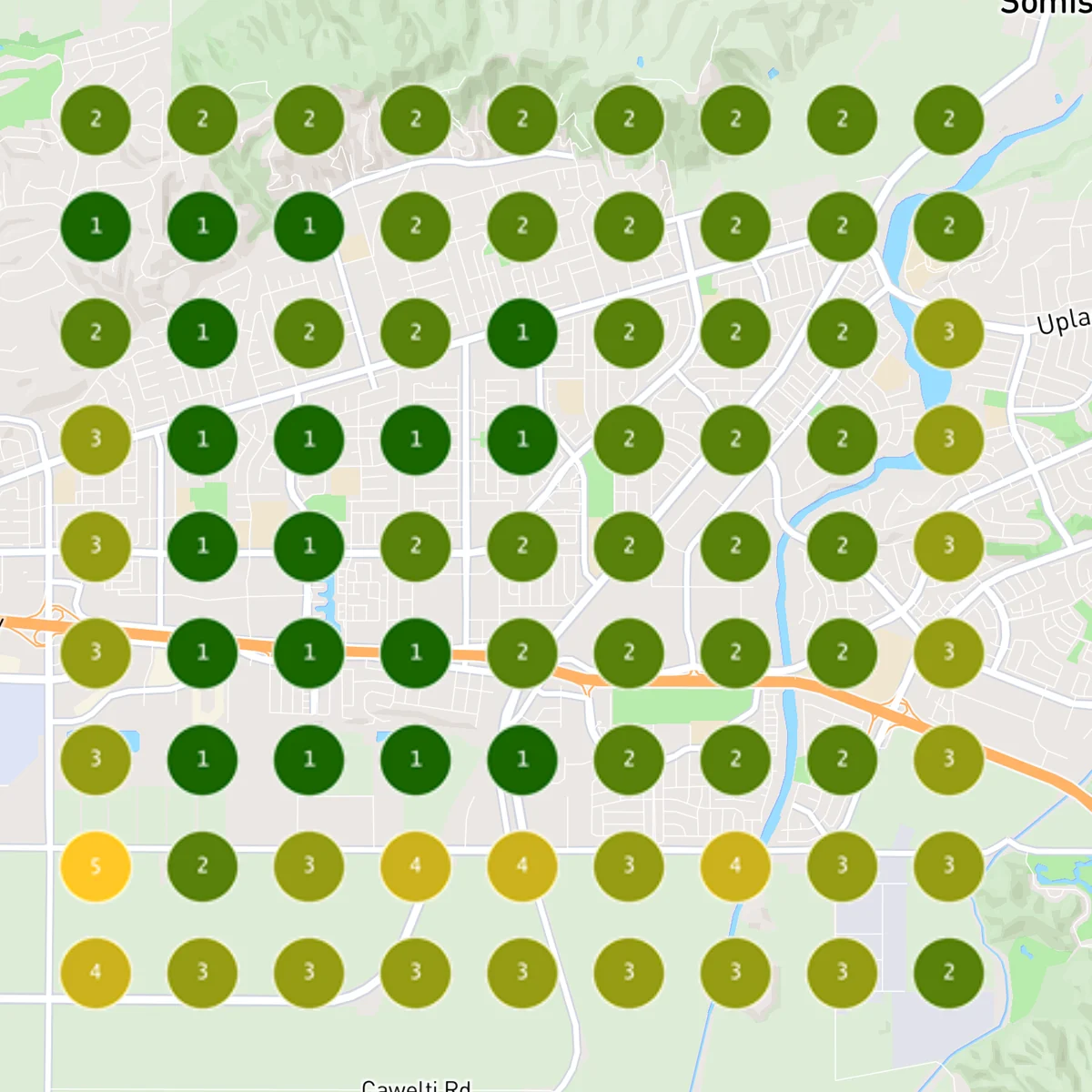
Channel Islands Pressure Washing went from 0% to 94% top 3 coverage in 7 days.

Sep 22, 2026 scan: a 9 by 9 grid of Google Maps ranking pins, none in the top 3
Before · Sep 22, 20260% of the map in Google’s top 3
Sep 29, 2026 scan: the same 9 by 9 grid, 93.83% of pins in the top 3
After · Sep 29, 202694% of the map in Google’s top 3

Each map is a 9 by 9 grid of Google Maps ranking pins. These are one business’s dated scans, not a promised position.

Try it free for 10 days. We guarantee more Google reviews and a higher Google ranking, or your money back.

Ranking your Google profile, answered.

How do I rank my Google Business Profile higher on Google Maps?

Google says local results are mainly based on relevance, distance, and popularity. Its help page then explains three factors: relevance, distance and prominence. Our read: you cannot change distance, so the work goes into relevance and prominence: the right primary category, every service you really offer (predefined ones first), complete and accurate details, an active profile, a steady flow of honest reviews, and a website that backs up your services.

What is the best primary category for a contractor?

The most specific category that represents your main business. Google says to choose categories that are “as specific as possible, but representative of your main business.” Our method: search your main service and city on Google Maps and see which category the top results use, then pick the one that truly describes your main business.

Does adding more cities to my service area help me rank there?

No, not currently. Sterling Sky’s finding: “The service area does not currently impact the ranking for SAB’s” (service-area businesses). Set your service area so customers know where you work, and do not expect it to widen where you rank.

Can I add service keywords to my business name?

Not unless they are part of your real name. Google says your name should reflect your business’s real-world name, and “Including unnecessary information in your business name isn’t permitted, and could result in the suspension of your Business Profile.” Google’s own example: “Midas Auto Service Experts” is not acceptable, “Midas” is.

Does keeping my Google profile active help?

Google’s own tips to improve your local ranking include keeping your business information up to date, responding to reviews, and adding photos and videos. Our view: regular job photos, posts and offers also show homeowners that your business is open and busy.

Should a contractor show the business address on Google?

Follow Google’s guidelines for your business type. Google says: “If you’re a service-area business, you should hide your business address from customers.” Google also says service-area businesses can’t list a virtual office unless that office is staffed during business hours.

Can I pay Google to rank higher on Maps?

No. Google says: “There’s no way to request or pay for a better local ranking on Google.”

Can Omnipresent manage my Google Business Profile?

Yes. We audit your profile, then optimize your categories, services, description and attributes, and keep it active with posts, offers, updates, photos and videos. We also run review requests after every completed job and reply to your new Google reviews. Setup takes about 5 to 10 minutes.

How fast will I see results?

You can see results in as little as 10 days.

How does the guarantee work?

We guarantee more Google reviews and a higher Google ranking, or your money back. If you don’t get both in your first 30 days of paid service, email us and we’ll refund your most recent monthly payment. It applies once you’ve shared your customer list and your review requests are running.

Your profile, done right. Every month.

We run your reviews, Google profile and AI search every month. Try it free for 10 days. We guarantee more Google reviews and a higher Google ranking, or your money back.